Tip Of AI
Discover what you can do with AI
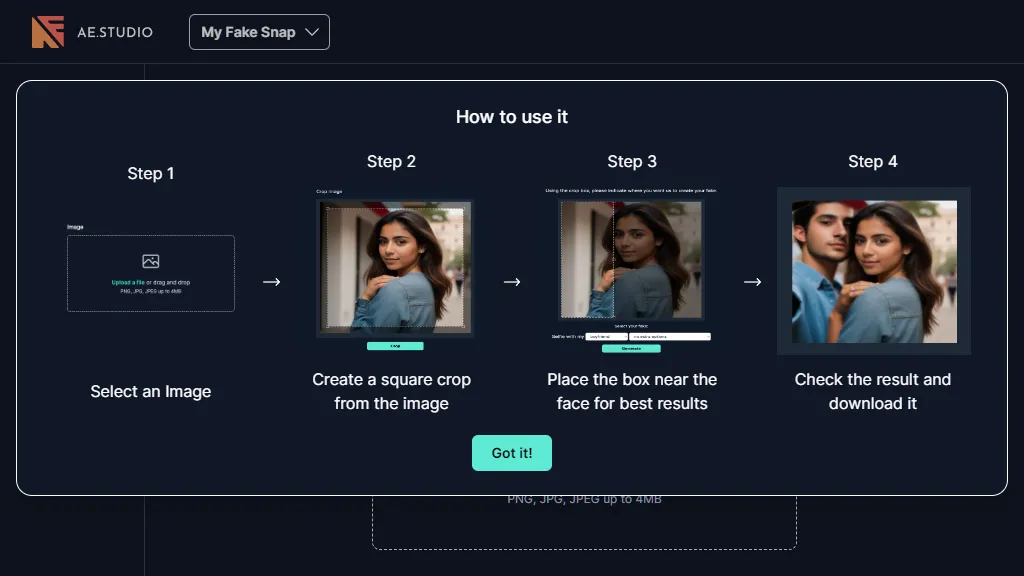
My Fake Snap is an online tool designed to help users create fake Snapchat screenshots. This tool provides a simple and straightforward process for users to upload an image, crop it, add fake options, and finally save and download the edited image. The first step is to upload an image, which can be easily done by either selecting a file from the computer or simply dragging and dropping it onto the website. The supported file formats include PNG, JPG, and JPEG, with a maximum file size of 4MB. After uploading the image, users are required to crop it to create a square frame. This step ensures that the final result looks authentic and seamlessly integrates with Snapchat's interface. Once the image is cropped, users can proceed to the next step, which involves adding fake options. This feature allows users to simulate conversations, fake snaps, or add other elements to make the screenshot look genuine. Users are encouraged to place the added elements near the face for the best results. After checking the result and ensuring everything looks as desired, users can save and download the edited image. This allows users to share the fake Snapchat screenshot on social media, prank friends, or use it for any other purpose they prefer. Overall, My Fake Snap provides a user-friendly and efficient solution for creating fake Snapchat screenshots. With its simple process, anyone can easily create realistic, yet fake, images in just a few steps.